34 Game-Changing RV Office Setup Ideas That'll Make Your Coworkers Jealous

Working from your RV doesn't mean sacrificing productivity for adventure. The right RV office setup can transform your mobile home into a workspace that rivals any corporate corner office — with better views and zero commute. Whether you're parked at a beachside campground or boondocking in the desert, these innovative solutions will keep you connected, comfortable, and crushing your deadlines.
Why Your Current RV Office Setup Isn't Cutting It
Most RV office setups fail because they're afterthoughts. You've probably tried the classic "laptop on the dinette" approach, only to discover your back aches after two hours and your screen is completely washed out by afternoon sun. The truth is, remote work demands thoughtful workspace design — especially when your office moves every few days.
As full-time RVers noted, "99% of RVs don't have desk space," making it crucial to get creative with your setup. But here's the thing: the best mobile offices aren't just about finding desk space. They're about creating zones that work both inside your rig and outside at your campsite. If you're still figuring out whether your current rig is even the right fit for remote work, our guide to choosing between compact travel trailers and van life as a digital nomad is a good place to start.
Essential Internet Solutions for Seamless Connectivity
Your RV office setup is only as good as your internet connection. Here's what actually works on the road:
Starlink is the obvious choice here — if you don't have it yet, stop reading and go order it. Seriously, it's a game-changer for remote locations where cell towers fear to tread.
Cellular Signal Boosters can dramatically improve your existing cellular connection when you're in those "one bar if you stand on your tippy toes" zones. Pair with unlimited data plans from major carriers for backup connectivity.
Multi-WAN Routers aggregate multiple internet sources, automatically switching between your best available connections. Because nothing kills a client presentation like explaining why you sound like a robot. For a full breakdown of what equipment actually holds up on the road, our guide to the best RV internet for remote work covers every option from Starlink to cellular bonding in detail.
Ergonomic Setup Solutions That Actually Work
Forget everything you know about RV furniture. Here are the game-changing ergonomic solutions that'll save your spine:
Zero Gravity Outdoor Office Chairs aren't just for lounging. These ergonomic masterpieces let you work with your feet elevated, reducing back strain during marathon work sessions. Look for models with adjustable headrests that double as laptop supports for video calls.
Lap Desks with Attitude — Premium lap desks with built-in mouse pads, device ledges, and memory foam cushions transform any seating situation into a proper workstation. They work perfectly with zero gravity chairs, your RV bed, or even that sketchy picnic table at your campsite.
Under-Desk Footrests — Adjustable memory foam footrests and under desk bamboo foot massagers transform cramped dinettes into ergonomic workstations. Because nobody should suffer through a three-hour Zoom call with their knees jammed under a table designed for hobbits.
Standing Desk Options — A collapsible portable standing desk lets you alternate between sitting and standing throughout the day without surrendering your limited floor space. Pair it with an anti-fatigue mat and you've got a legit ergonomic setup in under three square feet.
Portable Monitor Systems for Maximum Productivity
Single-screen productivity is so last decade. These portable monitor setups will revolutionize your mobile workspace:
Touch-Screen Portable Monitors offer 10-point touchscreen functionality and can be daisy-chained for multiple monitor setups. The intuitive fingertip control makes document editing and presentations incredibly smooth.
Laptop Outdoor Sun Shades help you work in very sunny conditions, and Anti-Glare External Laptop Monitors feature specialized coatings and high brightness levels that remain readable even in direct sunlight during outdoor work sessions. No more squinting at your screen like you're trying to decipher ancient hieroglyphics.
Ultra-Lightweight 4K Options deliver crystal-clear resolution in packages weighing less than two pounds. Triple monitor extenders can triple your productivity. Perfect for nomads who obsess over every ounce in their rig.
Workspace Design Strategies for Different RV Types
Your workspace design should match your RV's footprint and your work style:
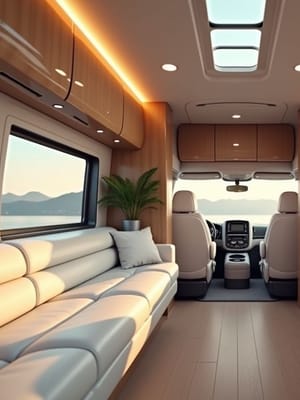
Class A Motorhome Offices — Large rigs offer the luxury of dedicated office spaces. Corner setups maximize square footage while providing natural light from multiple windows. Consider modular furniture that can reconfigure for different work modes.
Van Life Workstations — Compact rigs demand multi-functional solutions. Folding stools that double as laptop stands and storage solutions maximize every square inch. Wall-mounted swing-arm desk surfaces disappear when not needed.
Fifth Wheel Office Conversions — The rear bedroom area often converts into an excellent office space with proper furniture placement. Residential-sized windows provide ample natural light, and separated spaces reduce distractions. If you're still in the process of downsizing for RV life, deciding which gear earns its square footage is half the battle.
Your office view is better than theirs. Subscribe to our weekly newsletter.
THE SMARTEST RVERS READ THIS EVERY WEDNESDAY. IT'S FREE.
Unique Equipment Recommendations for Road Warriors
These aren't your basic office supplies. These are handpicked for the chaos, charm, and constant motion of RV life:
Blue Light Blockers That Don't Suck — Long hours on screens under shifting skies? You need blue light glasses that actually reduce eye strain without turning your world sepia. Ideal for anyone editing photos, designing logos, or doomscrolling between Zoom calls.
The Bed Desk You'll Pretend Is Temporary — Pair a structured backrest pillow with a bamboo laptop tray, and suddenly you've got a fully functional office where your mattress used to be just for sleeping. Bonus: doubles as a late-night snack station.
Cord Tamer for the Chronically Tangled — A structured tech pouch with internal compartments turns your mess of cables into a tidy little command center. No more mid-drive meltdowns when your charger vanishes into the void.
Anti-Glare Wizardry for Outdoor Workdays — A collapsible laptop hood that blocks sunlight turns your campsite picnic table into a legitimate workstation. Finally, outdoor work sessions can actually be productive instead of squint-inducing.
Multi-Purpose Storage Ottoman — A padded storage ottoman pulls double duty as extra seating, a footrest, and concealed storage for office supplies, cables, or anything else that accumulates during a long work sprint. In a rig where every piece of furniture needs to earn two jobs, this one earns three.
Lighting Solutions for Professional Video Calls
Your Zoom background might say "tropical paradise," but potato-quality lighting screams "unprofessional amateur hour."
Adjustable Key Lights with color temperature control connect to your phone for easy adjustments. Mount them on flexible arm clamps for precise positioning without eating up precious desk space.
Laptop-Mounted Ring Lights attach directly to your screen, eliminating unflattering shadows while maintaining portability. They're like having a professional photographer's lighting kit that fits in your laptop bag.
Natural Light Control Systems — Blackout curtains aren't just for sleeping. Strategic window coverings double as professional backdrops while controlling harsh sunlight that turns you into a silhouette during important calls. This is also worth keeping in mind for overall wellness — our piece on RV healthy living covers how light exposure throughout the day affects sleep quality and energy levels on the road.
Power Management for Extended Work Sessions
Running a full office setup off your RV's power system requires strategic planning:
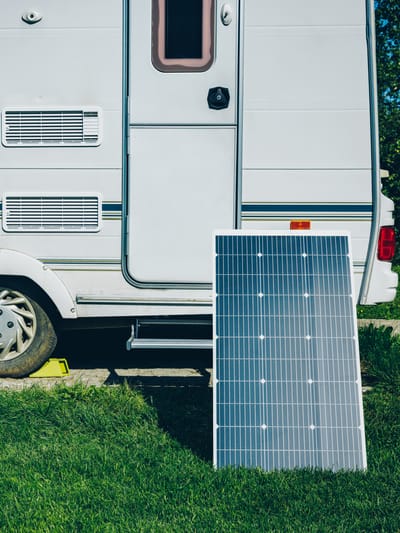
Solar Power Solutions — A minimum 400-watt solar setup with lithium batteries can support most office equipment. Smart solar charge controllers optimize charging efficiency and protect your investment. Our guide to building the perfect RV solar setup on any budget walks through panel sizing, battery banks, and inverter selection without requiring an electrical engineering degree.
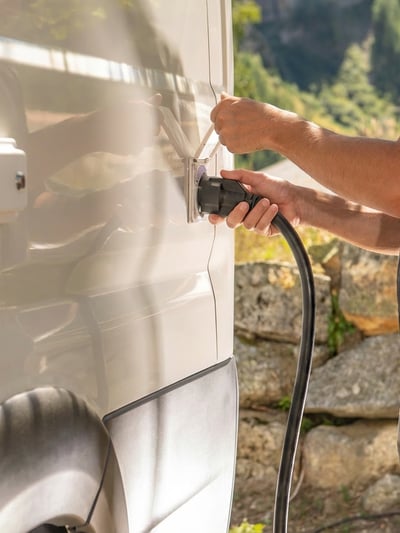
Pure Sine Wave Inverters prevent equipment damage and ensure stable power for sensitive electronics. Don't cheap out here — your laptop's power supply will thank you.
Battery Monitoring Systems with smartphone connectivity help you track power consumption in real-time. Knowledge is power, literally, when you're boondocking for extended periods. If you're new to managing power without hookups, our complete guide to boondocking without hookups covers the fundamentals, including how much battery capacity a typical home office setup actually draws. And if your battery has been behaving strangely, it's worth reading our breakdown of why RV batteries keep dying before assuming the worst.
Climate Control for Year-Round Productivity
Extreme temperatures can kill productivity faster than a dead internet connection:
Ceramic Tower Heaters with oscillation provide even heat distribution without overwhelming your electrical system. Look for models with programmable thermostats and safety shut-offs.
High-Velocity Circulation Fans create air movement that makes hot climates bearable. Position strategically to create cross-breezes that would make a coastal cottage jealous.
Dehumidifiers prevent condensation damage to electronics in humid climates. Compact dehumidifier models designed for RV use maintain ideal humidity levels without eating up counter space.
Storage Solutions for Digital Nomad Gear
Organization isn't just about aesthetics — it's about maintaining sanity when your office doubles as your living room. This is one of the harder adjustments for people coming from traditional home offices, and it's something our guide on downsizing for RV life addresses directly: what you own has to fit, function, and earn its place.
Modular Drawer Systems can be customized for cable management, office supplies, and backup equipment. Choose systems that interlock for stability during travel days.
Magnetic Organization Strips mounted under desks hold small metal items like paper clips, USB drives, and emergency chocolate. Command strips create instant organization without permanent modifications to your rig.
Expandable Filing Solutions — While digital is king, some documents need physical storage. Compact expanding files fit in most RV storage compartments and keep important papers organized and accessible.
Productivity Tips for Mobile Workspaces
The best equipment means nothing without solid productivity strategies:
Zone-Based Working — Create distinct areas for focused work, video calls, and creative tasks. Even small RVs benefit from psychological workspace separation. Your brain needs to know when it's "at work" versus "at home." For a deeper dive into structuring your workday on the road, our piece on why your RV deep work routine is failing is worth reading before you burn another afternoon on shallow tasks.
Noise Management — Dedicated workspaces help you stay focused and avoid distractions, but sometimes you need backup. Quality noise-canceling headphones are essential when your neighbors decide 6 AM is the perfect time for generator maintenance.
Golden Hour Optimization — Work during your RV's comfortable temperature windows and when internet traffic is lighter. Early morning productivity sessions often yield better results than afternoon heat-induced lethargy.
Advanced Setup Ideas for Tech-Savvy Nomads
Ready to take your mobile office to the next level?
Smart Home Integration — Wireless switches and sensors can automate your workspace lighting and climate control. Smart plugs let you control equipment remotely, so you can pre-heat your office space before stumbling out of bed.
Multi-Carrier Backup Internet — Hotspot devices from different carriers ensure you're never completely offline. When one network fails, automatic failover keeps you connected during critical work sessions.
VPN Security Solutions — Protect sensitive data on public Wi-Fi networks common in RV parks. Quality VPN services encrypt your connection and provide access to geo-restricted content for international nomads.
Location Strategy — Where you park matters as much as what you pack. Our roundup of underrated US cities where RV digital nomads are quietly thriving identifies spots with reliable infrastructure, fast internet, and real remote-work communities — because a great office setup in a dead zone is still a dead zone.
Your RV office setup should work as hard as you do. The key is creating systems that adapt to changing environments while maintaining professional standards. Whether you're closing deals from a mountaintop or attending video conferences from the beach, the right setup makes remote work feel like the freedom it was meant to be.
Start with the basics, then add components as you discover what works for your specific work style and travel patterns. Because let's be honest — the best office setup is the one that actually gets used, not the one that looks perfect on Instagram but sits unused while you work from your uncomfortable dinette like some kind of masochist.
FAQs
What is the best internet setup for working remotely from an RV?
Starlink is currently the most reliable option for remote work from an RV, particularly for locations outside cellular coverage. Most full-time working RVers pair it with a cellular data plan on a separate carrier as a backup. A multi-WAN router can automatically switch between connections, so a failed hotspot doesn't take down a client call. For campgrounds with strong cellular signal, a signal booster can meaningfully improve speeds. The right combination depends on where you park most often — urban campgrounds need a different solution than BLM dispersed sites.
How do I power a full home office setup while boondocking?
A 400-watt minimum solar array combined with a 100Ah lithium battery bank can support a laptop, monitor, router, and phone charging for a standard eight-hour workday. A pure sine wave inverter is essential for powering sensitive electronics cleanly — modified sine wave inverters can damage charging components over time. If you run high-draw items like a ceramic space heater, factor that separately, as those draw significantly more wattage than typical office equipment. Tracking your consumption with a battery monitor helps you plan around cloudy days and adjust usage before you run into problems.
What is the most space-efficient RV desk setup for a small rig?
The most versatile configuration for a small Class B or van is a lap desk paired with a zero gravity chair for extended work sessions, plus a collapsible portable standing desk for variety. This approach takes up almost no space when not in use and adapts to indoor and outdoor settings. A touch-screen portable monitor adds a second display without requiring a permanent mounting solution. For those with slightly more space, a wall-mounted fold-down surface offers a fixed desktop footprint that disappears when you need the floor back.
How do I reduce background noise during video calls in an RV?
Quality noise-canceling headphones eliminate most ambient campground noise at the listening end. For your microphone, a USB condenser mic with a cardioid pickup pattern captures your voice while rejecting sound from the sides and rear. Parking orientation also matters — positioning your rig so that slide-outs or the rig body faces the noise source creates a natural sound barrier. If you're in a park with generator hours or heavy foot traffic, scheduling important calls during early morning windows often gives you the cleanest audio environment.
What ergonomic gear matters most for long work sessions in an RV?
The two highest-impact upgrades are a proper lap desk or portable standing desk and a supportive chair that isn't your dinette bench. Under-desk footrests and bamboo foot massagers make a meaningful difference for people who work more than four hours at a stretch in a seated position. Blue light glasses reduce eye fatigue during long screen sessions, particularly relevant when you're shifting between bright outdoor light and dim interior work environments throughout the day. If neck pain is an issue, a cervical support pillow for your sleeping setup helps counteract the strain that builds up from working in unconventional positions.
Which RV types are easiest to set up as a mobile office?
Fifth wheels and Class A motorhomes offer the most flexibility, since their larger footprints and residential floor plans allow for semi-permanent desk areas. Rear bedroom conversions in fifth wheels work particularly well — they provide physical separation from the living area, which helps with focus and video call professionalism. Class B campervans require the most creative solutions but have the advantage of stealth parking in urban environments, which expands your location options significantly. Travel trailers with slide-outs gain enough interior width to accommodate a small dedicated workstation that doesn't have to be broken down every time someone needs to cook.
How do I stay productive when working across multiple time zones from my RV?
Structure your schedule around your most reliable internet and temperature windows rather than defaulting to traditional business hours. Async communication tools reduce the pressure of real-time availability, which matters when your afternoon might be spent driving. Batching calls into one or two daily windows gives you control over the rest of your schedule. Keeping a consistent morning routine — regardless of where you woke up — provides the psychological anchor that keeps workdays from dissolving into unstructured drift.





Categories
Related Posts


Subscribe to the Swervia Newsletter
The best RV stories, tips, and destinations—expertly curated and always free.